Your battery,
beautifully visible.
ChargePilot lives in your menu bar, and lights up your screen edge when your battery needs you.

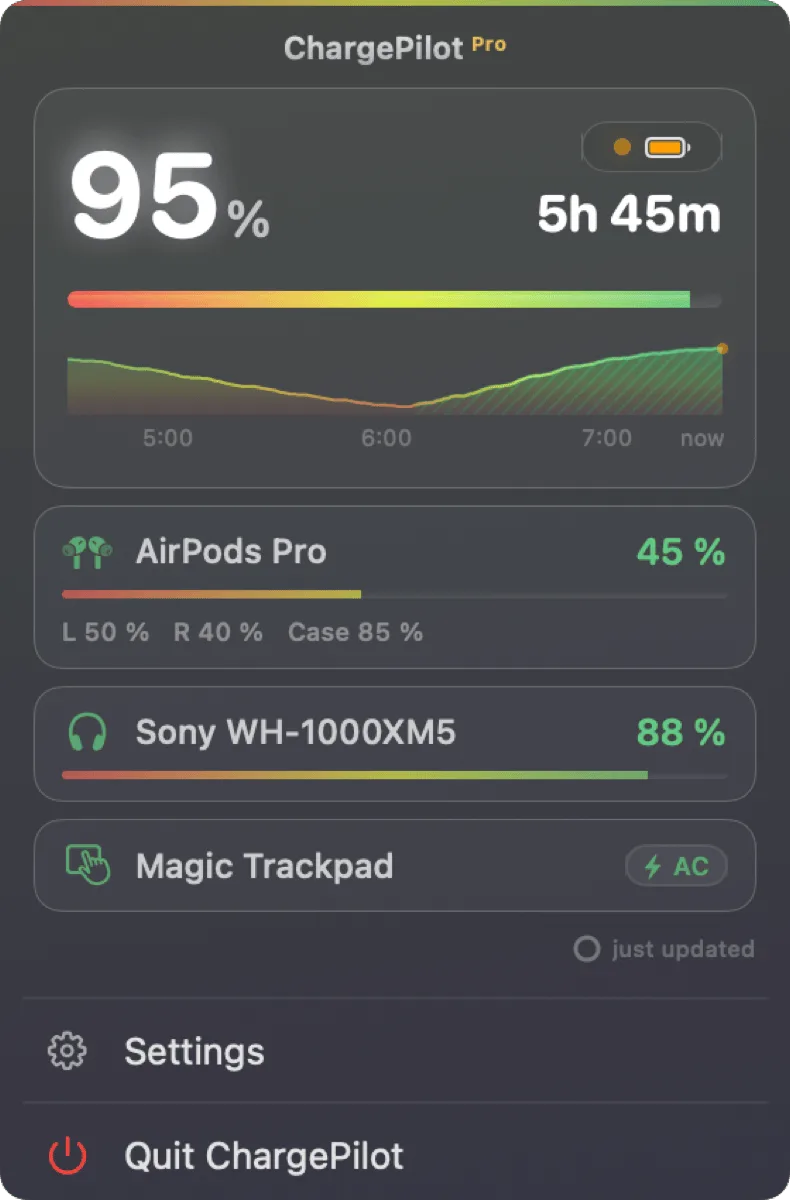

One tap. Everything that matters. Live stats, battery health, and every Bluetooth device: AirPods, headphones, trackpad.
15%: your screen warns you. A soft glow at the edge of your display. No popup spam, no sound.
In your way? Just hover. Warning bubbles dismiss with a hover, and behavior is fully configurable.
5%: critical alerts don't give up. They dodge your cursor and stay on screen until you plug in.
Plug in, and it settles down. The glow fades and a bubble confirms: Charger Connected.
Your battery,
beautifully visible.
ChargePilot lives in your menu bar, and lights up your screen edge when your battery needs you.
One click. Everything that matters.
Live stats, battery health, and every Bluetooth device: AirPods with left/right levels, headphones, trackpad.
15%: your screen warns you.
A soft glow at the edge of your display. No popup spam, no sound.
In your way? Just hover.
Warning bubbles dismiss with a hover, and behavior is fully configurable.
5%: critical alerts don't give up.
They dodge your cursor and stay on screen until you plug in.
Features
Small app. Full picture.
Smart Bubbles
Five alerts out of the box: two system events plus 20 / 10 / 5% warnings with screen glow. Critical ones stay until you plug in. Event-driven, no polling. Your own thresholds & styling with Pro.
Charger Connected
eventFully Charged · 100%
eventDraining · 20%
bubble 3 s + glowLow Battery · 10%
stays until plugged inCritical · 5%
persistent + glow staysScreen-Edge Glow
Your display edge glows when your battery needs you.
Battery Health
Condition, cycles, temperature, plus watts, volts and real mAh, live.
Condition Normal
Cycles 142
Temp 34.4 °C
Health History
ProA 30-day trend, so you spot degradation before it matters.
Bluetooth Devices
ProAirPods, headphones, trackpad: every battery in one popup.
Native, light & private
Built for macOS 13+, so it feels like it shipped with your Mac. English + German.
100% native. No Electron. No web views.
Themes
Make it yours.
16 hand-tuned themes, and every screenshot below is the real app. Hover to preview.Tap to preview.
Nordic
Pro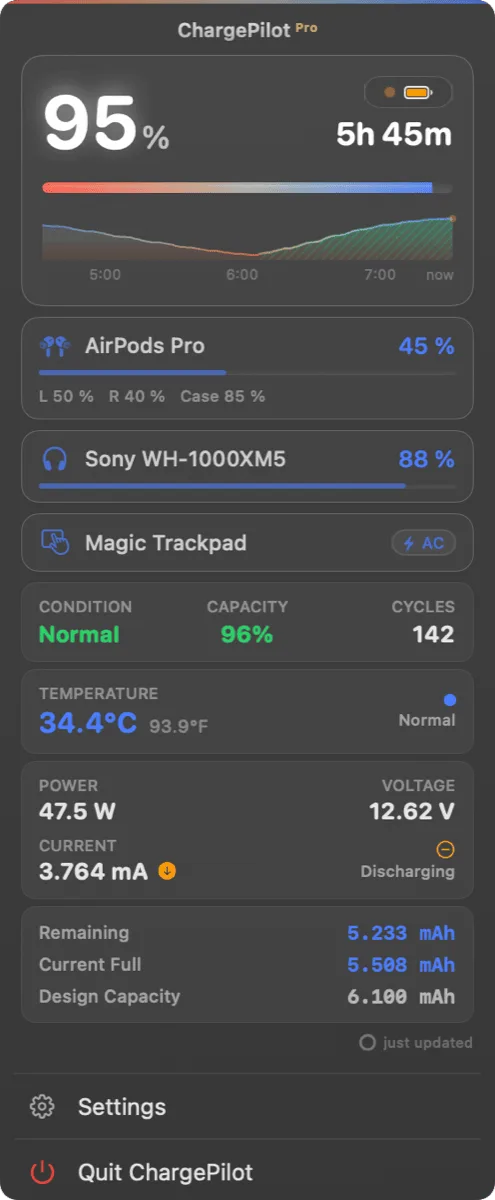
Menu Bar
Your menu bar, your style.
Battery glyph or minimal circle, with or without percentage, and it always speaks up: green bolt while charging, red when you're low.
Pricing
Free to use. Pro to personalize.
Every core feature is free, forever. Unlock Pro whenever you want more, with a single one-time payment.
Free
All the essentials to keep an eye on your battery.
Notarized by Apple
- Battery monitoring & menu bar widget
- Popup dashboard with live stats
- Smart Bubbles: 2 default events
- Battery health & cycle count
- English + German
Pro
LifetimePay once, own forever. No subscription.
30-day money-back guarantee
- Everything in Free
- Bluetooth device monitoring
- Battery health history & trends
- All themes + custom palettes
- Screen-edge glow, fully customizable
- Custom bubbles & your own thresholds
- Multi-monitor glow
A direct license activates on up to 6 Macs. Buy through the Mac App Store and Pro covers every Mac on your Apple ID, with Family Sharing support.
FAQ
Common questions
Is ChargePilot really free?
Yes. The core experience is free forever: battery monitoring, the menu bar widget, the popup dashboard, battery health with cycle count, and the two default Smart Bubbles (Charger Connected and Fully Charged). Pro adds Bluetooth device monitoring, health history, all themes, screen-edge glow, and full notification customization.
Is there a free trial?
There's no countdown trial, and you don't need one. The core app is free forever, so you can use ChargePilot as long as you like before deciding. When you want the Pro features, it's a one-time $9.99 unlock, no subscription. Buy directly from us and it's backed by a 30-day money-back guarantee.
Does it work with all MacBooks?
ChargePilot supports all MacBooks running macOS 13 (Ventura) or later, including both Intel and Apple Silicon Macs.
Does ChargePilot control my charging?
No, by design. ChargePilot is a monitoring app: it never interferes with macOS power management and installs no kernel extensions. Your Mac charges exactly as Apple intended. ChargePilot just makes sure you always see what's happening.
What's the difference between Free and Pro?
Free solves the core problem: you always know what your battery is doing, beautifully. Pro gives you control and depth: Bluetooth device batteries, health history and trends, every theme plus custom palettes, fully customizable Smart Bubbles with your own thresholds, screen-edge glow, and multi-monitor support.
How does it compare to the built-in macOS battery indicator?
macOS gives you a tiny icon and settings buried three panes deep. ChargePilot gives you a beautiful popup dashboard with live stats, event-driven Smart Bubbles, screen-edge glow warnings you can't miss, and your Bluetooth devices' batteries, all one click away in your menu bar.
How do Smart Bubbles work?
Smart Bubbles are ChargePilot's elegant, non-invasive on-screen notifications. Instead of polling your battery every few seconds like traditional tools, ChargePilot uses an event-driven architecture: it detects state transitions in real time. Two system events are active by default: "Charger Connected" confirms charging has started the moment you plug in, and "Fully Charged" alerts you the instant your battery hits 100%. With Pro, each bubble is individually configurable: color, size, position, display duration, even mouse dodge behavior, plus your own custom level thresholds.
How does ChargePilot compare to AlDente?
AlDente is a great app that pioneered charge limiting on Mac: it's about controlling how your battery charges. ChargePilot is about seeing and feeling what your battery is doing: event-driven Smart Bubbles instead of standard notifications, screen-edge glow warnings, and a dashboard that feels native to macOS. If you want beautiful, intelligent monitoring rather than charge control, ChargePilot is the better fit, and the core app is free.
Does ChargePilot collect my data?
No. ChargePilot runs 100% locally on your Mac. No data is sent to any server, ever. Your battery stats, usage patterns, and settings never leave your device. We believe privacy isn't a feature, it's a right.
Can I get a refund for Pro?
Of course. If you purchased Pro through the Mac App Store, Apple handles refunds within their standard policy. If you purchased directly from us, we offer a no-questions-asked 30-day money-back guarantee.
Will it slow down my Mac?
Not at all. ChargePilot uses virtually zero CPU and less than 20 MB of memory. It's designed to sit silently in your menu bar and do its job without you ever noticing it's there.
Is the $9.99 Pro upgrade a subscription?
No, it's a one-time payment. Pay once, own forever. No recurring charges, no annual renewals. All future updates to Pro features are included.
How many Macs can I use Pro on?
It depends where you buy. A license bought directly from us (Lemon Squeezy) activates on up to 6 Macs, and you can deactivate a Mac anytime to free up a slot. If you buy Pro through the Mac App Store, it's tied to your Apple ID instead, so it works on every Mac signed into that Apple ID, and can be shared with up to 6 people via Apple Family Sharing.
Is ChargePilot safe to install?
Absolutely. ChargePilot is notarized by Apple, meaning it has been scanned for malware and verified by Apple's security process. It's also signed with our Apple Developer ID. Your battery data never leaves your device: there is no telemetry and no analytics in the app. The only time it talks to the internet is to verify a Pro license key.
Will the screen-edge glow effect damage my display?
No. Modern Mac displays (LCD and OLED) are not susceptible to burn-in from software effects. The glow is rendered at safe brightness levels and uses standard macOS rendering. It's no different from any other on-screen content.
How do I install ChargePilot?
Download the DMG file, drag ChargePilot to your Applications folder, and open it. That's it, you'll see the ChargePilot icon appear in your menu bar within seconds. No complicated setup required.
How do I get help or report a bug?
Email us anytime at hello@getchargepilot.app, we typically respond within 24 hours.
Be first in line.
ChargePilot is launching soon. Join the waitlist and get early access the day it ships.